
How SaaS Founders Can Organize Product Demos, Documentation, and Free Trials
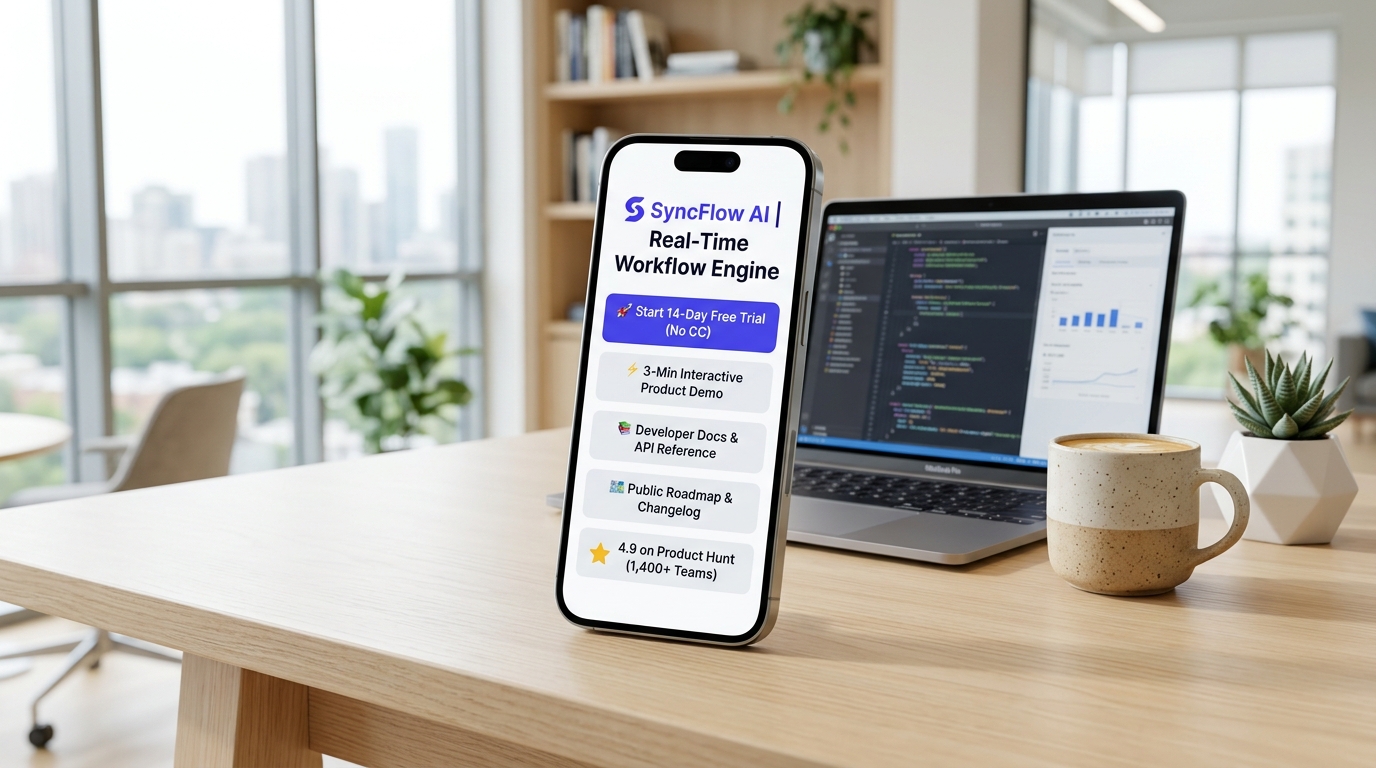
It is 9:45 AM on a Wednesday morning.
You open your laptop to discover that your latest build-in-public breakdown on X (Twitter) or LinkedIn just caught fire. Your post explaining how you engineered a real-time data sync pipeline has accrued over 120,000 impressions, 800 bookmarks, and dozens of shares from prominent engineers and tech leads.
Your profile visits are soaring. But when you pull up your PostHog analytics and Stripe dashboard, your excitement turns to confusion: trial signups and demo requests are virtually flat.
You open your notifications to investigate, and the disconnect becomes painfully obvious:
- 💬 X / Twitter DM 1: “Hey! The architecture breakdown was brilliant. Is there a 2-minute product sandbox or interactive demo I can click through without having to book a 30-minute sales Zoom call?”
- 💼 LinkedIn InMail: “We are an engineering team of 35 evaluating your workflow tool. Where can we inspect your API docs and SOC-2 security compliance? The link in your bio just lands on a generic marketing splash page.”
- 🐛 GitHub Discussion: “Tried to install your TypeScript SDK from the link in your bio, but the docs URL gave a 404 redirect. Where is your active quickstart guide?”
- 🚀 Product Hunt Comment: “Is your free trial self-serve or waitlist-only? I tapped the link in your bio expecting an app registration screen, but it routed me to a Calendly calendar instead.”
- 🤝 Angel Investor DM: “Loved your MRR milestone post. Where can I quickly review your pitch deck, public changelog, and current pricing tiers before our intro call tomorrow?”
If you are a SaaS founder, indie hacker, or technical product leader in 2026, this high-friction leak is bleeding your company’s revenue.
Modern software evaluation has changed permanently. Buyers—whether solo developers, engineering managers, or enterprise procurement directors—refuse to navigate cumbersome marketing labyrinths just to evaluate software. They want immediate, self-directed exploration: an instant free trial, a frictionless interactive product tour, accessible documentation, and transparent pricing.
Yet, most founders still link their social profiles to bloated desktop homepages burdened with 8-second load times, or dump 15 unorganized URLs into a generic dark-theme link tree that looks like an amateur gaming profile.
The result? High-intent prospects bounce within 4 seconds, viral momentum dissipates into vanity metrics, and pipeline velocity grinds to a halt.
The modern solution is an ultra-clean, high-speed, light-themed SaaS Product Hub powered by Linkage.Page.
In this comprehensive guide, we will unpack why mobile-first product hubs are revolutionizing SaaS distribution, explore the design psychology of modern light-theme software branding, and show you step-by-step how to launch an authoritative product hub that converts traffic into MRR.
The 3 Critical Bottlenecks Crippling Modern SaaS Distribution
Over 72% of software discovery now occurs in mobile-first environments: while founders scroll tech discussions on X in transit, browse LinkedIn updates between meetings, or click through newsletter recommendations on smartphones.
Yet, traditional SaaS marketing architecture creates three devastating conversion barriers:
1. The “Book a Demo” Friction Wall for Self-Serve Buyers
Modern software buyers suffer from acute sales call fatigue.
Forcing a prospective user through a 7-field qualification form just to schedule a discovery call next Tuesday kills over 68% of top-of-funnel conversion momentum. Developers and product managers want to touch the software immediately. If they cannot test a self-serve free trial or interact with a live product sandbox in under 60 seconds, they will bounce directly to an open-source alternative or a competitor with an instant onboarding flow.
2. Fragmented Developer Experience & Buried Documentation
Technical decision-makers evaluate software from the inside out:
- What does the SDK look like in Python or TypeScript?
- How clean is the API payload structure?
- How many lines of code are required to execute a “Hello World” query?
When documentation, API references, and GitHub repos are buried behind three tiers of nested navigation on a heavy desktop site, engineers immediately abandon their evaluation.
3. The Multi-Channel Link Chaos & Bio Disconnect
Founders build in public across a sprawling web of platforms: X, LinkedIn, GitHub, YouTube, Substack, and Product Hunt.
When an interested prospect clicks the founder’s bio link, they are often greeted by a confusing mess: an outdated Notion roadmap, a broken Loom link, or an uncurated list of 16 links that creates instant cognitive overload. Without a structured, prioritized hierarchy, prospective users don’t know what to click first, so they click nothing.
Fragmented Link Chaos vs. The Linkage SaaS Product Hub
To see how an organized mobile product hub transforms your lead qualification and pipeline velocity, compare traditional fragmented distribution with a unified Linkage product hub:
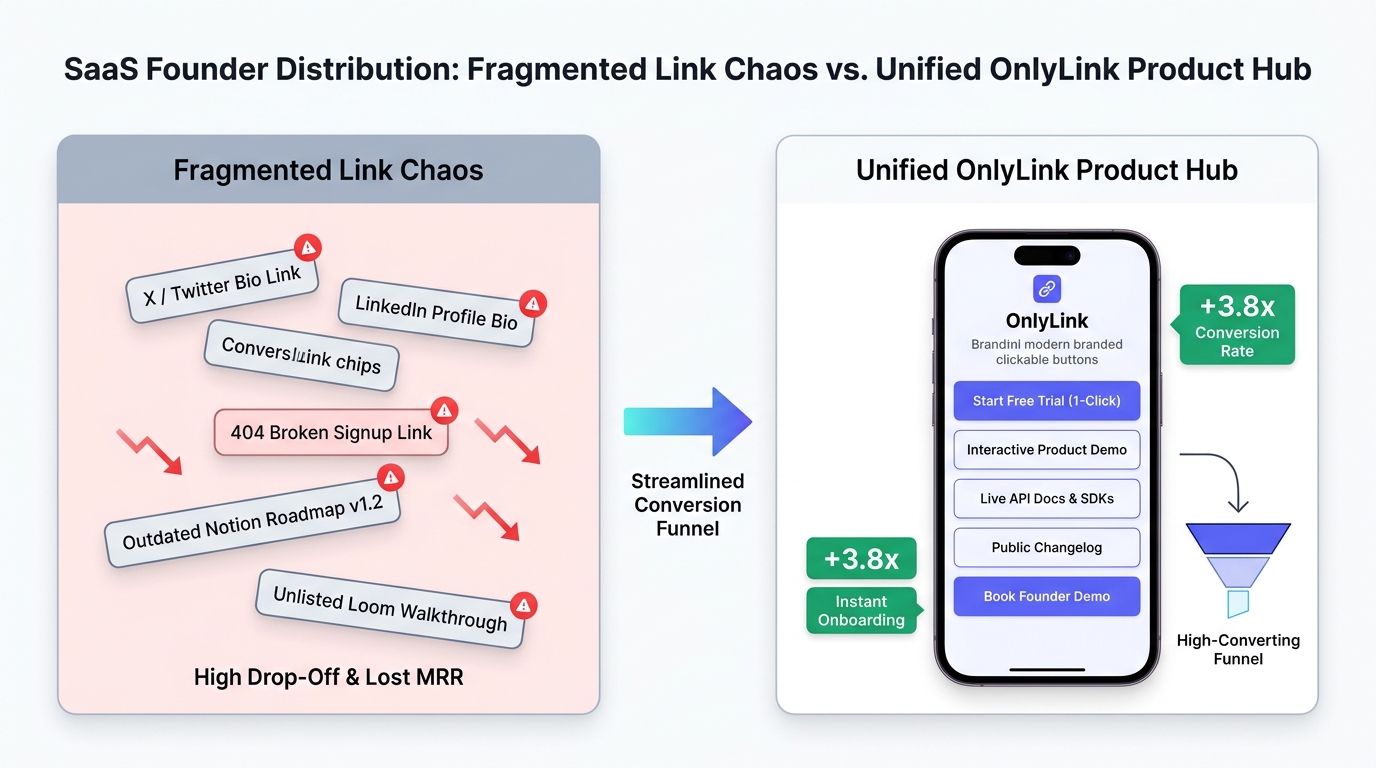
Side-by-Side Comparison: Traditional SaaS Links vs. Linkage Product Hub
| Feature | 🌪️ Fragmented Link Chaos | ⚡ Linkage Light-Theme SaaS Hub |
|---|---|---|
| First Impression | Cluttered link tree or heavy 6-second desktop site | Luminous, editorial light-theme UI (#FFFFFF & #F8FAFC) |
| Mobile Speed | 4–7 seconds with bulky JS marketing trackers | Sub-second instant load (< 0.4s) on any mobile network |
| Product Demo | Unlisted Loom video buried in social DMs | 1-click interactive sandbox demo (Storylane / Navattic / Arcade) |
| Trial Onboarding | Intimidating “Book a Demo” sales wall | Frictionless 1-click self-serve trial (No credit card required) |
| Documentation Access | Buried in submenus or behind login walls | Dedicated cards for API Quickstart, SDKs & Swagger Docs |
| Roadmap & Changelog | Outdated Notion page or forgotten Trello board | Live cards for Weekly Changelog & Public Feature Voting |
| Social Proof & Metrics | Vague claims and unverified quotes | Verified Product Hunt #1, G2 4.9-star & GitHub star badges |
| Enterprise Sales Path | Confusion between enterprise and self-serve | Dedicated “Book 15-Min Founder Architecture Call” button |
| Uptime & System Health | Missing status page or broken links | Real-time “🟢 99.99% Uptime · All Systems Operational” badge |
| Contact Persistence | Easily forgotten social handles | 1-tap vCard button saving founder direct contact to phone |
Why Light-Theme Visuals Are Essential for B2B SaaS & Tech Founders
In the software industry, visual aesthetics directly signal engineering sophistication and product quality.
While dark themes with neon green or cyberpunk accents have had a moment in gaming and cryptocurrency, high-growth B2B SaaS, developer tooling, and modern tech leaders (such as Stripe, Linear, Vercel, Apple, and Notion) embrace clean, minimalist, high-contrast light design.
┌────────────────────────────────────────────────────────────────────────┐
│             THE LIGHT-THEME PSYCHOLOGY IN SAAS BRANDING                │
│                                                                        │
│   Pristine White Canvas (`#FFFFFF` / `#F8FAFC`)                        │
│   ➔ Evokes Architectural Discipline, Modern Elegance & Precision       │
│                                                                        │
│   Electric Indigo & Violet (`#6366F1` / `#4F46E5`)                     │
│   ➔ Signals Intelligent Engineering, Innovation & Product Polish       │
│                                                                        │
│   Vibrant Teal & Emerald Green (`#06B6D4` / `#10B981`)                 │
│   ➔ Communicates 99.99% System Health, Growth & Real-Time Performance  │
│                                                                        │
│   High-Contrast Dark Charcoal Typography (`#0F172A`)                   │
│   ➔ Guarantees Razor-Sharp Readability for Code Snippets & API Docs    │
│                                                                        │
└────────────────────────────────────────────────────────────────────────┘
Key Advantages of Light-Theme UI for SaaS Companies:
- Alignment with Leading Developer Design Systems: Modern SaaS pioneers like Linear, Stripe, Raycast, and Vercel revolutionized software design by proving that pristine white surfaces, crisp typography, and subtle border radiuses command higher perceived value. A light-theme Linkage hub positions your startup as a polished, enterprise-ready solution.
- Flawless Sunlight Legibility on the Move: Tech founders, developers, and investors review links while walking between conference halls, commuting, or outdoors in daylight. Dark-mode interfaces reflect ambient light and create severe screen glare. A high-contrast light theme guarantees that your feature points, pricing tiers, and API docs are effortlessly readable anywhere.
- Optimized Visual Hierarchy for High-Converting CTAs: On an immaculate white and pale slate background, vibrant gradient action buttons (like electric indigo or violet) create an irresistible focal point. Prospective users immediately know where to click to launch the interactive demo or start their free trial.
The 4-Stage SaaS Product Evaluation & Trial Conversion Funnel
Transforming passive social followers and content consumers into active paying customers requires a frictionless, four-stage digital evaluation journey:
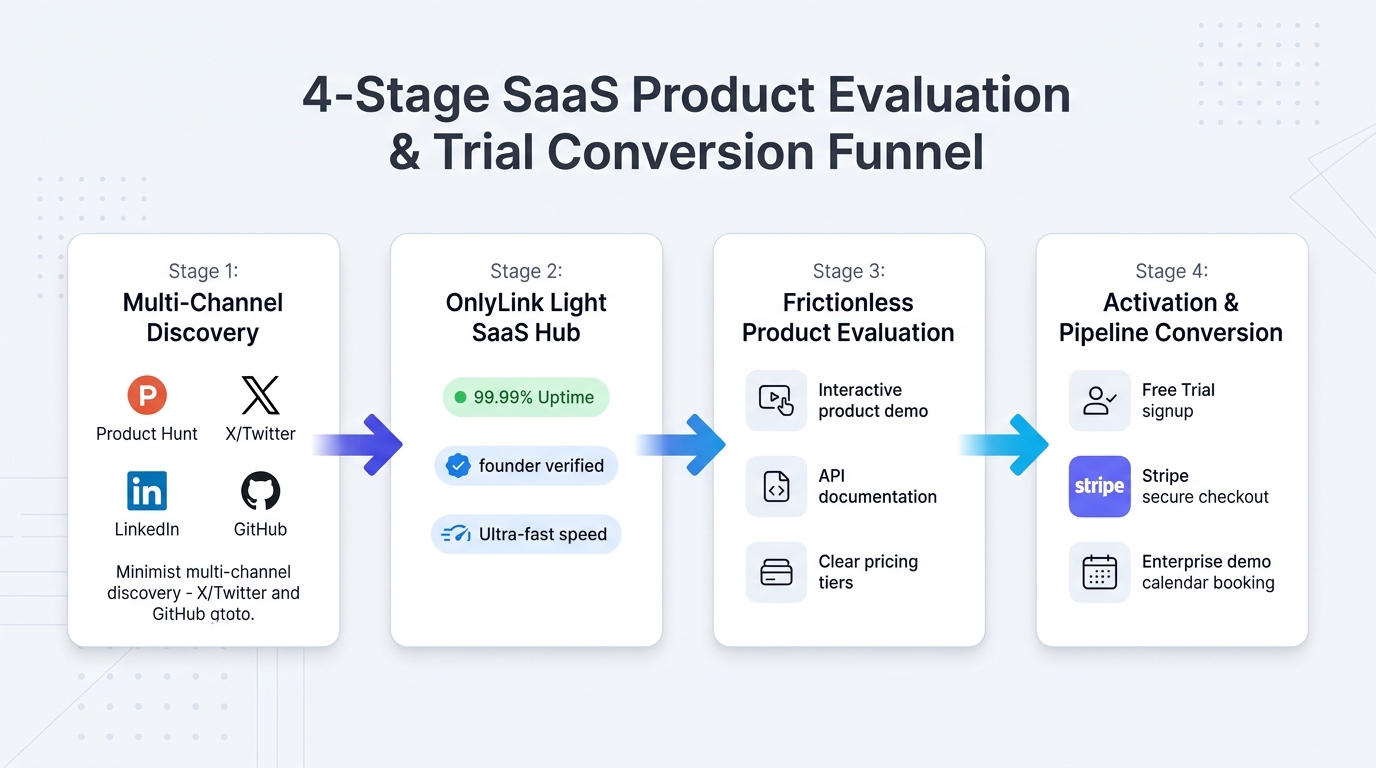
Stage 1: Multi-Channel Discovery
Prospective software users discover your product through high-intent channels:
- Founder Build-in-Public Posts: Technical deep dives on X/Twitter and LinkedIn explaining your architecture, roadmap, and design choices.
- Product Hunt Launches & Tech News: Launch day visibility, Hacker News discussions, and newsletter sponsorships.
- Developer Ecosystems: Open-source GitHub repositories, npm packages, and PyPI libraries.
- Founder Podcasts & Conference Panels: Industry speaking engagements and tech webinars.
Every channel directs curious evaluators to your clean, memorable Linkage address: go.linkage.page/@syncflow.
Stage 2: The Linkage Light SaaS Hub
The prospect taps your link and lands on a page that loads in under 400 milliseconds. They are immediately greeted by:
- A crisp vector company logo and clear one-sentence value proposition.
- Credibility badges: "✨ Product of the Day on Product Hunt" and "⭐ 4.9 on G2".
- Real-time operational transparency: "🟢 99.99% Uptime · All Systems Operational".
Stage 3: Frictionless Product Evaluation
Before creating an account, evaluators explore at their own pace:
- They click the Interactive Product Demo to experience a 3-minute clickable sandbox (powered by Storylane, Navattic, or Arcade) without signing up.
- Technical buyers click into Developer Docs & API Reference to inspect SDK setup guides and endpoint schemas.
- They review transparent Pricing Tiers and feature comparisons.
Stage 4: Activation & Pipeline Conversion
With all friction removed, prospects take immediate action:
- Self-Serve Users: Tap the primary button: "🚀 Start 14-Day Free Trial (No Credit Card Required)" and enter the live web app in 30 seconds.
- Enterprise & Team Buyers: Tap "💬 Book 15-Min Founder Architecture Call" to schedule a high-touch demo directly on Calendly.
- Active Developers: Star your repository on GitHub or join your community Discord/Slack.
The Anatomy of an Award-Winning SaaS Founder Bio Hub
Here is what an elite, high-converting light-theme SaaS founder directory looks like on a modern smartphone:
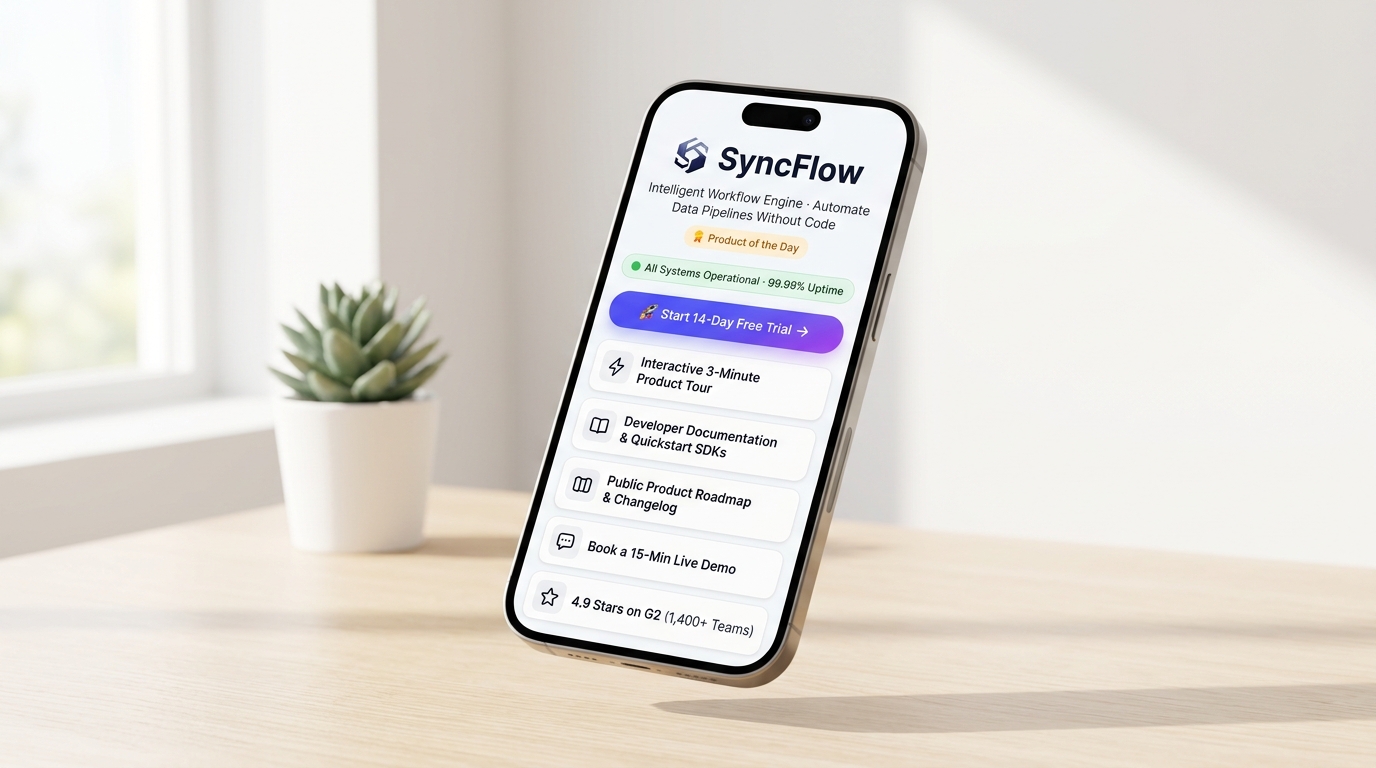
Structural Breakdown of the Hub Architecture
<!-- Structural Outline of a High-Converting SaaS Founder Product Hub -->
<section class="saas-product-hub">

  <!-- 1. SaaS Branding, Value Proposition & Real-Time Uptime -->
  <header class="saas-header">
    <img src="/avatar-syncflow-saas.svg" alt="SyncFlow AI" class="saas-logo">
    <h1>SyncFlow AI</h1>
    <p class="saas-tagline">Real-Time Workflow & Data Pipeline Engine for Developers</p>
    <div class="badges-row">
      <span class="badge-ph">🏆 #1 Product of the Day</span>
      <span class="badge-uptime">🟢 99.99% Uptime</span>
    </div>
  </header>

  <!-- 2. Primary High-Conversion Hero Action Button -->
  <div class="primary-action">
    <a href="https://app.syncflow.io/signup" class="btn-indigo-gradient">
      🚀 Start 14-Day Free Trial (Instant Access · No CC) →
    </a>
  </div>

  <!-- 3. Self-Directed Interactive Demo & Walkthrough -->
  <div class="card-group">
    <a href="https://demo.syncflow.io" class="feature-card interactive-demo">
      <div class="icon">⚡</div>
      <div class="info">
        <h3>Interactive 3-Minute Product Tour</h3>
        <p>Test our real-time workflow builder live in your browser · No login needed</p>
      </div>
    </a>
  </div>

  <!-- 4. Developer Resources, Quickstarts & API Docs -->
  <div class="card-group">
    <a href="https://docs.syncflow.io" class="resource-card">
      📚 <strong>Developer Documentation:</strong> API Reference, Schemas & Quickstart SDKs
    </a>
    <a href="https://github.com/syncflow/syncflow-core" class="resource-card">
      ⭐ <strong>GitHub Open-Source SDK:</strong> 4,200+ Stars · TypeScript, Python & Go
    </a>
  </div>

  <!-- 5. Transparency: Public Roadmap & Changelog -->
  <div class="card-group">
    <a href="/changelog" class="roadmap-card">
      🗺️ <strong>Changelog v2.4 & Public Roadmap:</strong> Vote on upcoming integrations
    </a>
  </div>

  <!-- 6. Enterprise Concierge: Founder Demo Call -->
  <div class="card-group">
    <a href="https://calendly.com/founder/syncflow-demo" class="demo-card">
      💬 <strong>Need Enterprise Custom Solutions?</strong> Book a 15-min call with the Founder
    </a>
  </div>

  <!-- 7. Verified Social Proof & Customer Reviews -->
  <div class="trust-badge-card">
    <div class="stars">⭐⭐⭐⭐⭐</div>
    <p><strong>4.9 Stars on G2 & Capterra</strong> · Trusted by 1,400+ Engineering Teams</p>
  </div>

  <!-- 8. Founder Direct Contact (vCard) -->
  <div class="vcard-action">
    <a href="/founder-alex-chen.vcf" class="btn-vcard">
      📲 Save Founder Direct Contact & Investor Deck (vCard)
    </a>
  </div>

</section>
Visual Styling Guidelines for SaaS Hubs:
- Background Canvas: Pure optical white (
#FFFFFF) or ultra-subtle tech slate (#F8FAFC). - Card Containers: Immaculate white boxes with razor-thin borders (
border: 1px solid #E2E8F0), modern 16px corner radiuses, and light elevation drop shadows (box-shadow: 0 4px 16px rgba(15, 23, 42, 0.04)). - Primary Gradient Accent: High-contrast electric indigo to violet gradient (
linear-gradient(135deg, #4F46E5 0%, #7C3AED 100%)) for the primary Free Trial CTA button. - Secondary Accents: High-tech cyan (
#06B6D4) for interactive demo badges, and emerald green (#10B981) for the live operational uptime pill. - Typography: Deep charcoal slate (
#0F172A) ensuring maximum contrast and legibility for technical descriptions.
4 Core Pillars of a High-Converting SaaS Founder Hub
Pillar 1: The Frictionless 3-Tier Trial & Interactive Demo Engine
The fastest-growing SaaS companies accommodate different buyer personas through a three-tiered evaluation system:
- The Casual Explorer (Interactive Demo): Embed an interactive guided tour using tools like Storylane, Navattic, or Arcade. Prospects can click through your software’s core features directly inside their mobile browser without creating an account or typing an email address.
- The Ready-to-Build User (Self-Serve Free Trial): A prominent primary button linking directly to your frictionless signup page. Emphasize “Instant Access · No Credit Card Required” to eliminate onboarding hesitation.
- The Enterprise Buyer (Founder Call): For accounts requiring SSO, custom SLAs, or HIPAA/SOC-2 compliance, provide a direct 15-Minute Founder Architecture Consultation link via Calendly or Cal.com.
Pillar 2: Categorized Developer Docs, Quickstarts & SDKs
Technical software products win or lose based on their developer experience (DX).
Organize your technical resources into clear, actionable cards:
- Quickstart Guide: A 5-minute tutorial showing how to initialize your SDK and run the first API call.
- Interactive API Reference: Direct links to your Swagger, ReadMe, or Mintlify documentation.
- Language SDKs: Direct links to your official TypeScript, Python, and Go client repositories on GitHub.
- Postman / Insomnia Workspace: A downloadable collection allowing backend engineers to test endpoints immediately.
Pillar 3: Transparent Pricing, Public Roadmap & Changelog
Modern software buyers resent hidden pricing:
- Transparent Pricing Tiers: Link directly to a clear pricing breakdown (e.g., “Free Tier up to 10k events · Growth at $49/mo · Enterprise Custom”). Being upfront about pricing immediately qualifies high-intent leads and builds trust.
- The Weekly Changelog: Regularly updating your release notes shows prospective buyers that your engineering team is shipping rapidly and listening to feedback.
- Public Feature Roadmap: Allowing users to view and vote on upcoming features (via tools like Canny or Featurebase) demonstrates radical transparency and customer-first alignment.
Pillar 4: Real-Time Social Proof, Uptime & Investor Assets
Trust is the ultimate currency in B2B software:
- Real-Time Uptime Status Pill: A green badge reading "🟢 99.99% Uptime · All Systems Operational" linking to your Statuspage or Better Uptime dashboard reassures buyers that your infrastructure is rock-solid.
- Verified Review Badges: Prominently showcase verified ratings from Product Hunt, G2, Capterra, or TrustRadius to remove perceived adoption risk.
- Investor & Press Kit Access: Include a discreet link to your one-page pitch deck, media asset logos, and founder bio for venture capital investors and journalists discovering your profile.
For more insights on optimizing conversion funnels, explore our guide on the anatomy of a high-converting bio page.
4-Day Implementation Roadmap for SaaS Founders
Transforming your social profiles into an automated trial generation machine takes less than an hour of focused execution. Follow this practical 4-day launch schedule:
┌────────────────────────────────────────────────────────────────────────┐
│               4-DAY SAAS FOUNDER PRODUCT HUB ROADMAP                   │
├────────────────────────────────────────────────────────────────────────┤
│                                                                        │
│  DAY 1: Audit & Streamline Conversion Assets                           │
│  • Record a 3-minute interactive demo or Storylane tour                │
│  • Finalize direct signup URLs with UTM parameters                     │
│                                                                        │
│  DAY 2: Build & Brand Your Light-Theme Linkage Hub                     │
│  • Claim your product link: go.linkage.page/@yourproduct               │
│  • Apply a crisp light theme (white, slate, electric indigo)           │
│  • Upload vector SVG logo, one-sentence tagline & uptime status        │
│                                                                        │
│  DAY 3: Connect Demos, Docs, Calendly & PostHog Analytics              │
│  • Add cards for Interactive Demo, API Docs, GitHub & Pricing          │
│  • Connect PostHog/Google Analytics tracking ID to monitor clicks      │
│                                                                        │
│  DAY 4: Deploy Across Founder Bios, Company Socials & READMEs          │
│  • Update X (Twitter), LinkedIn, GitHub profile, YouTube & Substack    │
│  • Add Linkage badge to open-source repository README files            │
│                                                                        │
└────────────────────────────────────────────────────────────────────────┘
Day 1: Audit Assets & Streamline Links
- Review your top 5 conversion assets: interactive demo sandbox, self-serve trial signup, API docs, changelog, and founder calendar.
- Generate clean tracking URLs with UTM parameters (
?utm_source=linkage&utm_medium=bio_hub) to measure traffic sources accurately.
Day 2: Build Your Light-Theme Linkage Hub
- Claim your custom URL at Linkage.Page (
go.linkage.page/@yourproductorgo.linkage.page/@foundername). - Choose an immaculate light-theme palette (pure white background, soft slate borders, electric indigo CTA buttons).
- Add your verified badges (Product Hunt, G2) and a live system uptime indicator.
Day 3: Connect Interactive Demos & Docs
- Configure your primary hero button to open your 14-day free trial registration screen.
- Link your interactive product walkthrough, developer documentation, and public roadmap.
- Embed your PostHog, Plausible, or Google Analytics tracking ID to track funnel drop-offs.
Day 4: Deploy Across All Founder & Brand Channels
- Replace your bio links on X / Twitter, LinkedIn, GitHub organization, YouTube channel, and Substack newsletter.
- Add a Linkage badge to your open-source GitHub README and include the link in your conference slide deck closing slide.
For additional branding recommendations, check out our guide on designing a bio page that matches your personal brand.
Real-World Case Study: How “SyncFlow AI” Boosted Trial Signups by 63%
To see how an organized product hub impacts a growing software company, look at SyncFlow AI, a developer workflow automation platform built by a team of three technical co-founders.
The Problem Before Linkage:
- The Viral Traffic Leak: A viral technical post on X by the CEO generated 140,000 impressions and 2,400 bio visits, but yielded fewer than 18 trial signups.
- The “Book a Demo” Drop-Off: Their old bio link redirected to a generic homepage with an intimidating 6-field demo request form. Over 85% of mobile visitors bounced without filling out the form.
- Lost Developer Evaluators: Software engineers complained on Hacker News that they couldn’t locate the TypeScript SDK documentation or view pricing without speaking to a sales rep.
The Solution with Linkage:
- The founders launched
go.linkage.page/@syncflowusing a pristine, light-theme palette with electric indigo buttons. - They added an Interactive 3-Minute Storylane Demo where visitors could test workflow nodes live in their browser.
- They made the "🚀 Start 14-Day Free Trial (No CC Required)" button their prominent primary action.
- They added dedicated cards for API Documentation, GitHub SDKs, transparent pricing tiers, and a public changelog.
The Results After 60 Days:
- 📈 63% Increase in Free Trial Signups: Monthly trial activations surged from 140 to 228 qualified developer accounts.
- ⚡ 3.8x More Product Demo Views: Over 1,200 prospective users engaged with the interactive sandbox demo on mobile devices.
- ⏱️ Sales Cycle Shortened by 14 Days: Enterprise prospects reviewed the API docs, SOC-2 compliance, and pricing before their first call, arriving pre-educated and ready to close.
- ⭐ 350+ New GitHub Stars: Placing their open-source SDK link directly on their mobile hub drove continuous community growth.
Frequently Asked Questions (FAQ)
Does a Linkage hub replace our main SaaS marketing website?
No. Your marketing website remains essential for long-form desktop search engine optimization (SEO) and deep product pages. Linkage serves as your high-speed mobile conversion gateway. When users discover your brand through social bios, conference slides, or mobile emails, Linkage delivers a sub-second, distraction-free interface optimized specifically to route visitors into your trial funnel.
How do we balance self-serve free trials with high-ticket enterprise sales?
A well-structured Linkage hub caters to both audiences simultaneously. Position your self-serve free trial as the primary hero button for developers and small teams, while offering a dedicated secondary card: "🏢 Evaluating for Enterprise (100+ seats)? Book a 15-Min Founder Architecture Call". This allows small accounts to self-onboard while capturing high-value enterprise leads.
Can we track UTM parameters and conversion analytics through Linkage?
Yes! Linkage provides built-in real-time analytics tracking clicks, referrers, and geographic data. Furthermore, you can append custom UTM parameters to every outbound button URL (e.g., ?utm_source=linkage&utm_campaign=trial_hero) to monitor user journeys inside PostHog, Mixpanel, or Google Analytics.
Should early-stage founders display a public roadmap before product-market fit?
Yes, displaying a public roadmap (or weekly changelog) builds tremendous trust with early adopters. Software buyers want to know that your startup is actively shipping updates and responsive to feature requests. Showing a clear direction proves momentum and reduces the perceived risk of adopting a new software tool.
How do we embed interactive product demos into our hub?
You can use modern interactive demo platforms like Storylane, Navattic, Arcade, or Supademo. These platforms provide a lightweight, embeddable web link that you simply paste into a Linkage card. When a user taps the card, it opens a responsive, interactive sandbox experience directly in their mobile browser.
Conclusion: Upgrade Your SaaS Growth Engine
In the competitive world of software, the distance between curiosity and conversion must be near zero. Every extra click, slow-loading page, or mandatory qualification call is an invitation for your prospective users to look elsewhere.
Your product evaluation experience should reflect the speed, elegance, and reliability of the software you build.
By replacing chaotic social links and slow websites with a sleek, light-themed Linkage product hub, you empower prospective customers to test your product, inspect your documentation, and start a free trial on their own terms.
You will eliminate evaluation friction, convert viral attention into measurable MRR, and build a frictionless digital front door that scales with your company.
Ready to build your SaaS product hub? Claim your product’s free Linkage directory today and launch your high-converting product hub in minutes.
Ready to build your link in bio?
Create your free Linkage page in under a minute: unlimited links, analytics and custom designs.
Get started freeKeep reading
How Home Service Contractors Can Turn Social Profiles Into Quote Requests
Discover how plumbers, HVAC technicians, electricians, roofers, and general contractors turn social media …
How Beauty Salons Can Create a Mobile-Friendly Appointment and Service Directory
Discover how modern beauty salons, hair studios, nail bars, and aesthetic spas build a high-speed, light-theme …