
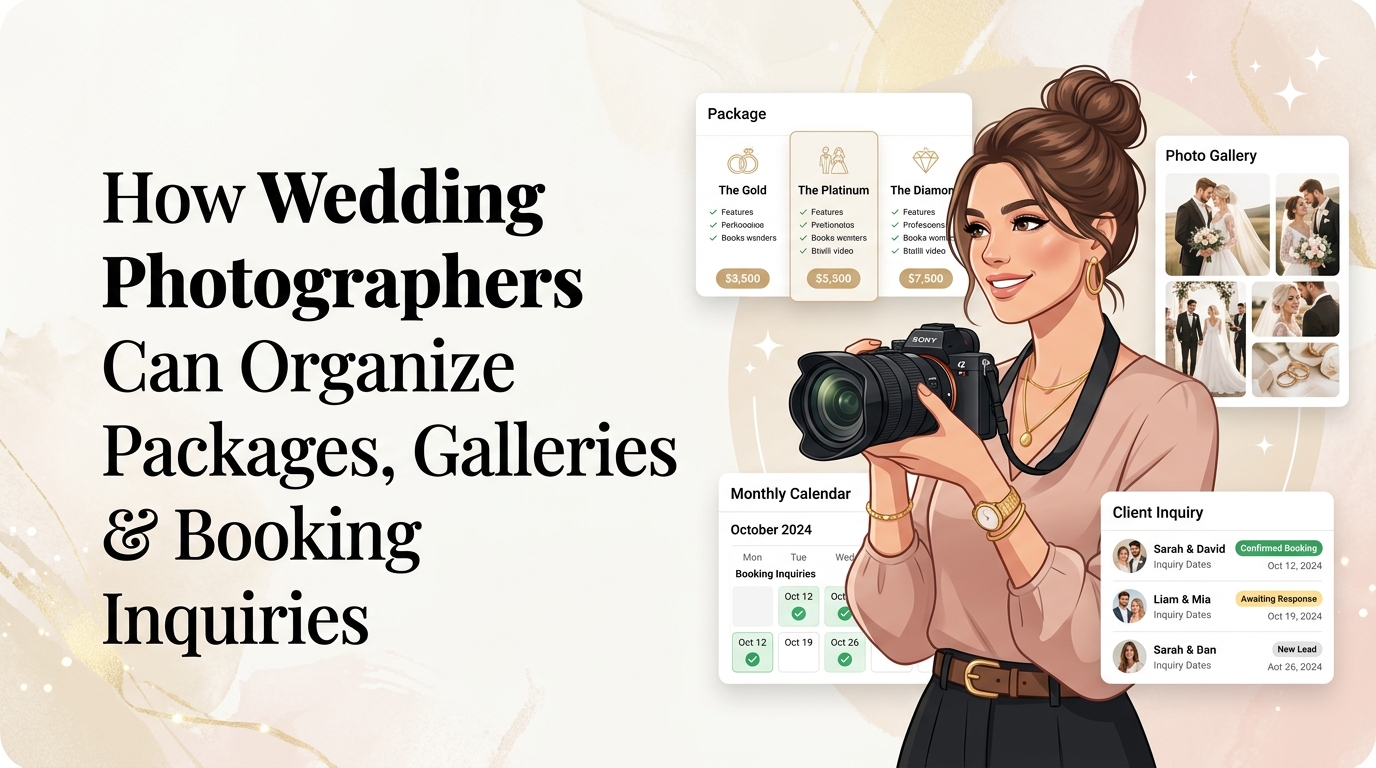
How Wedding Photographers Can Organize Packages, Galleries, and Booking Inquiries
It is 11:45 PM on a Sunday night in the middle of wedding season.
You just returned home from a 10-hour wedding shoot. Your camera bags are lined up in the hallway, your feet ache, and six memory cards containing 4,200 raw files are backing up onto your solid-state drives.
You open your smartphone to set an alarm for tomorrow morning, and you are immediately bombarded by notifications:
- 📱 Three Instagram DMs: “Hi! We love your work! Can you send us your pricing for June 14th next year?”
- 📩 Two unread emails: “We saw your reel at Kestrel Park—do you have a full wedding gallery we can see? Also, what’s included in your 8-hour package?”
- 💬 A text from a current bride: “Hey! Can you re-send our gallery link? My mom is trying to download her mother-of-the-bride portraits and we lost the email!”
- 💍 A notification from The Knot: “New prospective bride inquiry: Budget flexible, ceremony in Aspen.”
If you are a professional wedding or elopement photographer in 2026, this scene is all too familiar.
Wedding photography is one of the most rewarding creative professions in the world—capturing once-in-a-lifetime milestones, editorial love stories, and raw emotional moments. But as your creative reputation grows, your back-office administrative workflow can rapidly become an overwhelming tangle of scattered links, buried pricing PDFs, lost inquiry messages, and fragmented delivery portals.
The bottleneck isn’t your visual artistry, your camera equipment, or your storytelling skills. The bottleneck is conversion friction and link fragmentation.
When an engaged couple discovers your viral Reel, TikTok transition, or Pinterest mood board, they are at peak inspiration. If your single bio link directs them to a slow, 15-page desktop website with buried prices, or an overwhelming plain-text link tree with zero visual warmth, up to 75% of prospective couples abandon their search and click over to a competitor.
By transforming your social media bio into an elegant, high-speed, light-themed wedding photography micro-hub powered by OnlyLink.click, you can present transparent packages, showcase breathtaking full-day story galleries, and capture qualified date inquiries in seconds.
Here is your complete guide to streamlining your wedding photography packages, galleries, and booking inquiries into a seamless, high-converting digital storefront.
The 3 Critical Bottlenecks Costing Wedding Photographers Bookings
Engaged couples today make purchasing decisions faster and more digitally than ever before. Over 84% of modern brides and couples discover and vet wedding vendors entirely on mobile devices—during lunch breaks, evening sofa sessions, or while touring physical venues.
Yet, most wedding photographers unknowingly subject their prospective couples to three major friction points:
1. The “DM for Pricing / Email for Investment Guide” Barrier
Hiding all pricing behind an email inquiry form was the industry standard a decade ago. In 2026, it is the number one reason couples click away.
Modern couples have defined budgets. When a photographer demands their full contact info and wedding details just to see a starting ballpark price, couples feel anxious and inconvenienced. Transparent starting rates don’t diminish your luxury appeal—they instantly establish trust, weed out non-budget-aligned inquiries, and attract couples who respect your value.
2. The Slow, Heavy Desktop Portfolio Trap
Traditional photography websites built on heavy WordPress templates or bloated visual builders frequently take 5 to 8 seconds to render high-resolution images on mobile cellular connections.
When a couple taps your bio link at an outdoor venue and is greeted by a spinning loading wheel or giant uncompressed image banners, their patience evaporates. Research shows that every 1-second delay in mobile load speed reduces inquiry conversions by 16%.
3. The Fragmented Client Delivery & Vendor Hub
Your bio link shouldn’t just speak to future couples; it is also a vital bridge for current clients and industry partners.
When your active brides have to hunt through their spam folders for their Pixieset or Pic-Time gallery login, or when wedding planners and florists cannot easily find your contact details and downloadable vendor photo albums, valuable referral momentum is lost.
Disorganized Chaos vs. The OnlyLink Light-Theme Hub
To visualize why unifying your digital touchpoints changes your business economics, compare the traditional scattered workflow with a unified wedding photography hub:
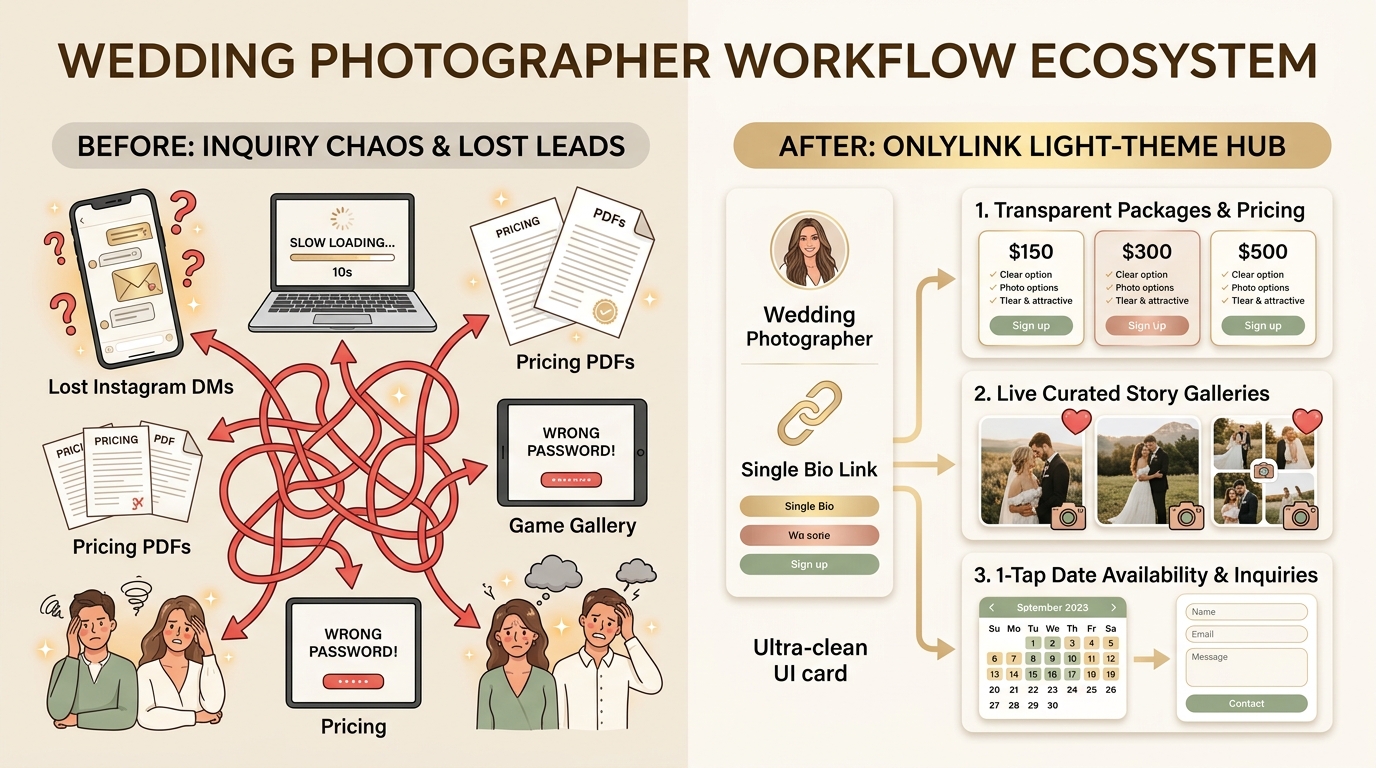
Side-by-Side Comparison: Traditional Workflow vs. OnlyLink Wedding Hub
| Business Element | 🌪️ Traditional Fragmented Workflow | ⚡ OnlyLink Light-Theme Wedding Hub |
|---|---|---|
| First Impression | Dark generic link trees or heavy desktop pages | Luminous, bridal-inspired light theme (#FFFFFF / #FAF8F5) |
| Mobile Speed | 4–7 seconds with heavy scripts & unoptimized photos | Sub-second instant load (< 0.4s) on any 5G/4G device |
| Package Presentation | 20-page cumbersome PDF attachments via email | Clean, interactive 3-tier cards with transparent starting rates |
| Portfolio Evidence | 9-image curated Instagram grid (highlight bias) | Curated full-day story galleries (getting ready to send-off) |
| Inquiry Process | Clunky contact forms requiring 15 mandatory fields | 1-tap date availability checker + instant consultation booking |
| Client Portal | Passwords lost in forgotten email threads | Dedicated 1-click private client gallery access button |
| Vendor Networking | Paper business cards that get tossed in the trash | 1-tap vCard digital business card save straight to mobile contacts |
| Social Proof | Buried testimonials on a hidden website sub-page | Verified client quotes, Google 5-star ratings & publication badges |
Why Light-Theme Visuals Are Essential for Wedding Photographers
Design psychology is paramount in luxury bridal and wedding marketing.
While dark modes and neon accents have their place in tech, gaming, or crypto environments, the wedding industry is fundamentally defined by lightness, warmth, airiness, and natural luminosity.
┌────────────────────────────────────────────────────────────────────────┐
│             THE LIGHT-THEME PSYCHOLOGY IN WEDDING BRANDING             │
├────────────────────────────────────────────────────────────────────────┤
│                                                                        │
│   Crisp Ivory & White Canvas  ➔  Reflects Natural Light & Fine Art     │
│   Soft Champagne & Gold Tones ➔  Communicates Prestige & Luxury        │
│   Blush Rose & Warm Taupe     ➔  Inspires Romance & Emotional Warmth   │
│   Slate Charcoal Typography   ➔  Ensures Effortless Outdoor Contrast   │
│                                                                        │
└────────────────────────────────────────────────────────────────────────┘
Key Aesthetic Advantages of a Light-Theme Bio Hub:
- Faithful Photographic Color Representation: High-end wedding photography relies on soft pastels, creamy skin tones, ivory lace, and lush green florals. A pristine light backdrop (
#FFFFFFor#FAF8F5) prevents optical color contamination, allowing your images to look vibrant and natural. - Harmonious Bridal Editorial Feel: Leading bridal publications—from Vogue Weddings and Martha Stewart Weddings to Style Me Pretty—consistently employ bright, minimalist white-space layouts. A light-theme profile immediately signals high editorial sophistication.
- Flawless Readability Under Bright Sunlight: Couples frequently browse vendor links while walking through sunny vineyard venues, garden estates, or outdoor bridal expos. Dark-themed pages suffer from blinding outdoor screen glare; high-contrast light layouts remain legible and easy to read.
To explore more about modern mobile design trends, see our guide on designing a bio page that matches your personal brand.
Pillar 1: Organizing High-Converting Wedding Packages & Investment Guides
Wedding packages should never feel like a confusing cafeteria menu. If you offer too many options with ambiguous names, prospective couples experience decision paralysis.
A high-converting OnlyLink bio hub organizes your services into three distinct, clearly defined tiers, supplemented by high-margin add-on cards.
┌────────────────────────────────────────────────────────────────────────┐
│                    THE 3-TIER WEDDING PACKAGE MATRIX                   │
├────────────────────────────────────────────────────────────────────────┤
│                                                                        │
│  [ TIER 1: INTIMATE & ELOPEMENT ] ─── 4 to 5 Hours Coverage           │
│  • Single Photographer • Online Delivery • Starting at $2,800         │
│                                                                        │
│  [ TIER 2: THE SIGNATURE STORY ]  ─── ★ MOST POPULAR (8 Hours)         │
│  • 2 Photographers • Engagement Session • Starting at $4,600          │
│                                                                        │
│  [ TIER 3: LUXURY WEEKEND ]       ─── Full Weekend (10–12 Hours)      │
│  • Rehearsal Dinner • Heirloom Album • Drone • Starting at $7,200       │
│                                                                        │
└────────────────────────────────────────────────────────────────────────┘
1. Tier 1: The Intimate Elopement & City Hall Experience
- Ideal for: Courthouse nuptials, mountain elopements, and intimate gatherings under 30 guests.
- Coverage: 4 to 5 consecutive hours with one lead photographer.
- Deliverables: High-resolution digital gallery, personal printing rights, 48-hour sneak peek preview.
- Starting Price Highlight: Transparent badge (e.g., “Starting at $2,800”).
2. Tier 2: The Signature Full-Day Story (The Gold Standard)
- Ideal for: 75% of traditional weddings with getting-ready portraits through the first dances.
- Coverage: 8 consecutive hours of seamless coverage.
- Key Inclusions: Lead photographer + experienced second shooter (capturing groom prep and alternate ceremony angles), complimentary engagement session, and digital gallery delivery.
- Badge Highlight: Mark this tier with a subtle “Most Popular Choice” or “Couples’ Favorite” tag to anchor your value.
- Starting Price Highlight: (e.g., “Starting at $4,600”).
3. Tier 3: The Luxury Weekend & Destination Celebration
- Ideal for: Multi-day weekend weddings, destination celebrations, and luxury estate events.
- Coverage: Up to 10–12 hours of wedding day coverage plus rehearsal dinner or welcome party coverage.
- Key Inclusions: 2 shooters, drone aerial landscape portraits, luxury 12x12 custom leather heirloom album, and fast-track 14-day full gallery turnaround.
- Starting Price Highlight: (e.g., “Starting at $7,200”).
Showcase High-Margin Add-Ons via Mini Visual Cards
Beneath your core packages, include compact visual cards for popular add-ons:
- The Engagement Adventure Session: $650 (Great for couples wanting to practice before the big day).
- Nostalgic 35mm Film & Super 8 Reel: $850 (A massive viral trend among Gen Z and millennial brides).
- Custom Linen & Leather Heirloom Albums: From $900 (Guaranteed long-term print revenue).
Pillar 2: Showcasing Galleries That Prove Consistency (Not Just Highlights)
Any photographer can capture three lucky photos during golden hour and post them to an Instagram grid. Savvy couples know this—and they actively look for proof that you can handle tricky lighting, dark reception tents, rainy ceremonies, and fast-moving dance floors.
Your OnlyLink hub should organize your portfolio into curated, full-story galleries rather than a loose assortment of individual images.
┌────────────────────────────────────────────────────────────────────────┐
│                   PORTFOLIO GALLERY ORGANIZATION HUB                   │
├────────────────────────────────────────────────────────────────────────┤
│                                                                        │
│   [ CARD 1 ] ── Napa Valley Vineyard Wedding (Full Real Gallery)       │
│   [ CARD 2 ] ── Big Sur Coastal Sunset Elopement                       │
│   [ CARD 3 ] ── Modern Black-Tie Historic City Hall Celebration        │
│   [ CARD 4 ] ── 🎥 60-Second Cinematic Photo Film Reel                 │
│   [ CARD 5 ] ── 🔒 Private Client Portal (Pixieset / Pic-Time Login)   │
│                                                                        │
└────────────────────────────────────────────────────────────────────────┘
Best Practices for Organizing Your Portfolio Links:
- Link to 2–3 Full Wedding Stories: Include direct links labeled “View Full Real Wedding: Chloe & Marcus at Sunstone Villa”. When prospective brides can scroll through 300+ consecutive images from a single wedding—from morning makeup to sparkler exit—their confidence in your reliability skyrockets.
- Categorize by Venue Style: Group your gallery links by aesthetic: Wine Country Vineyards, Coastal & Beachfront, Industrial Loft & Urban, or Intimate Forest Elopements. This allows visitors to immediately explore weddings that mirror their own dream setting.
- Embed a Video Reel: If you shoot hybrid photo-and-video or produce vertical BTS reels on Instagram, embed an auto-playing muted video preview directly in your hub to captivate visitors in their first 3 seconds on page.
- Dedicated VIP Client Portal Button: Add a secure card titled “Active Couples: Access Your Private Gallery”. When current couples need to review their proofs or share photos with wedding guests, they can simply tap this button rather than bothering you for their direct URL.
To discover how other visual artists display their work seamlessly, review our deep-dive on how freelancers can showcase their portfolio with one link.
Pillar 3: The 4-Stage High-Converting Booking Inquiry Engine
Capturing wedding inquiries requires a streamlined funnel that eliminates every unnecessary obstacle between initial interest and a booked discovery call:
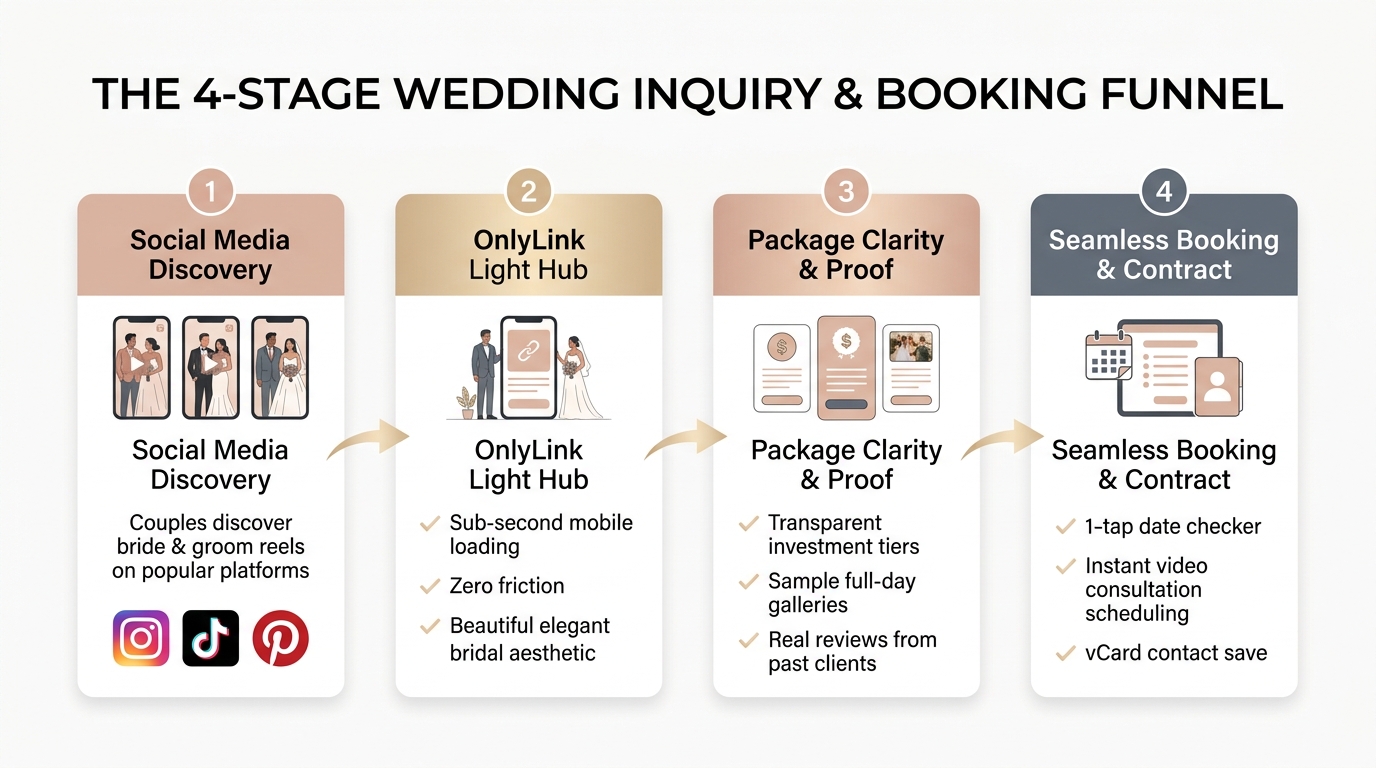
Stage 1: Social Media Discovery
Couples discover your work where they spend their leisure time: watching emotional first-look reactions on Instagram Reels, wedding photo poses on TikTok, or mood boards on Pinterest. Every post caption concludes with a simple, direct call-to-action: “Planning your 2026/2027 wedding? Check date availability via the link in our bio.”
Stage 2: The OnlyLink Light Hub
The couple taps your link and lands on your custom OnlyLink profile. The page renders in under 400 milliseconds, bathing their screen in a refined, light-themed bridal palette that feels like an extension of a luxury magazine.
Stage 3: Package Clarity & Proof
The couple taps into your transparent pricing tiers, reviews your full-day gallery deliverables, and reads verified quotes from brides who praise your calming presence and prompt delivery.
Stage 4: Seamless Booking & Contract
Instead of filling out an intimidating 20-field form or waiting 3 days for an email reply, the couple interacts with your high-speed inquiry tools:
- The 1-Tap Date Availability Checker: A clear button that prompts: “Getting Married in 2026 or 2027? Select Your Date & Venue to Check Our Availability.”
- The 5-Question Mobile Form: Name, Wedding Date, Venue City, Estimated Guest Count, and Dream Vision.
- Instant Video Consultation Booking: A direct Calendly or Acuity integration allowing couples to instantly lock in a 20-minute Zoom chemistry call.
- 1-Tap vCard Download: Enables brides to instantly save your phone, email, and studio name directly into their phone’s contact list so you never get lost in their inbox.
The Anatomy of an Award-Winning Wedding Photographer Bio Link
Here is how all these elements come together into an ultra-clean, light-theme mobile profile:
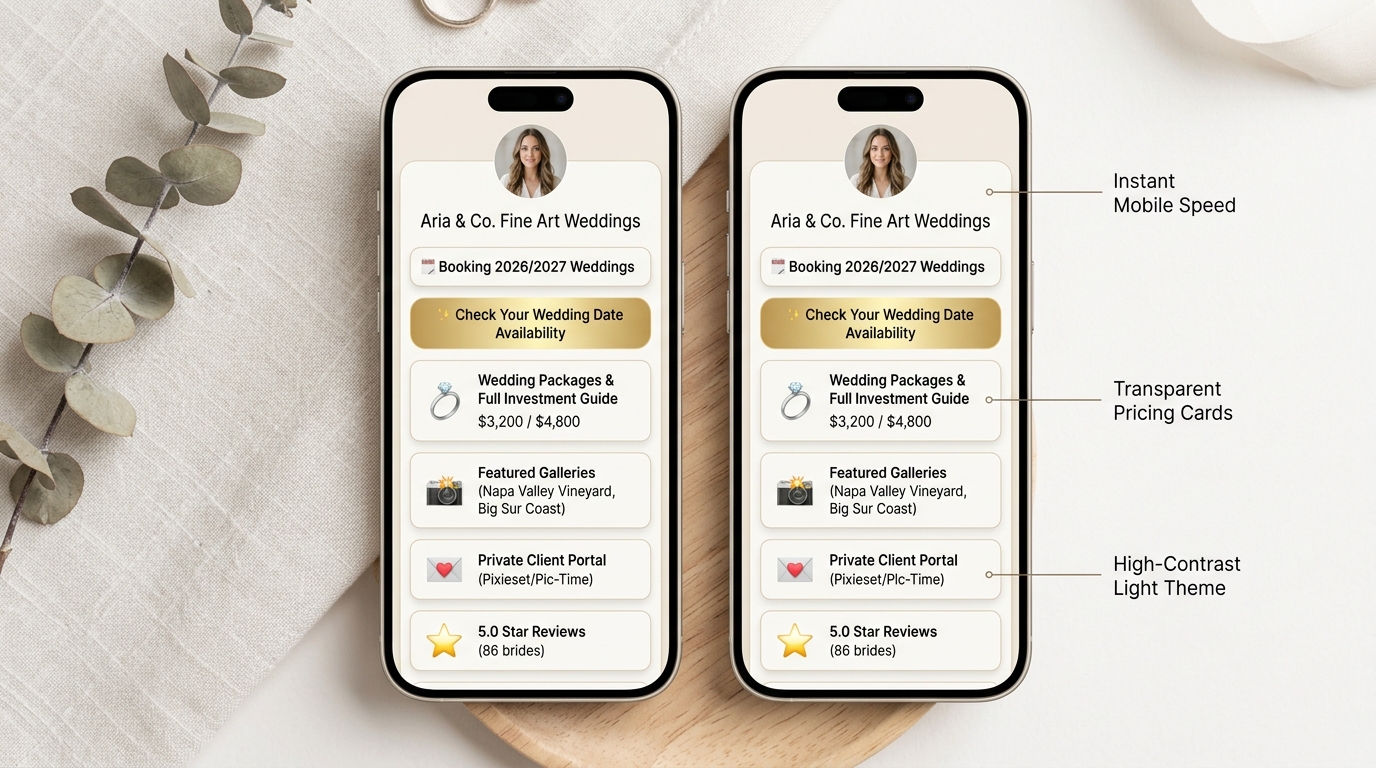
Breakdown of the Light-Theme Layout Architecture:
<!-- Structural Outline of a High-Converting Wedding Photography Hub -->
<section class="wedding-bio-hub">

  <!-- 1. Header & Identity -->
  <header class="profile-header">
    <img src="/avatar-aria-vance.jpg" alt="Aria Vance Fine Art Wedding Photography" class="avatar-ring">
    <h1>Aria & Co. Fine Art Weddings</h1>
    <p class="tagline">Editorial Storytelling for Hopeless Romantics · California & Worldwide</p>
    <div class="availability-badge">📅 Now Booking 2026 & 2027 Celebrations</div>
  </header>

  <!-- 2. Primary High-Intent Call to Action -->
  <div class="primary-cta-button">
    <a href="#inquire" class="btn-gold-glow">✨ Check Your Wedding Date Availability</a>
  </div>

  <!-- 3. Investment & Packages Cards -->
  <div class="card-group">
    <div class="card-package">
      <h3>💍 2026 Wedding Packages & Investment Guide</h3>
      <p>Transparent starting rates from $3,200 · Full-day stories & elopements</p>
    </div>
  </div>

  <!-- 4. Curated Full Galleries -->
  <div class="card-group">
    <div class="card-gallery">
      <h3>📷 Featured Real Wedding: Sunstone Winery</h3>
      <p>Explore 350+ full-day delivery frames from morning prep to sparkler send-off</p>
    </div>
    <div class="card-gallery">
      <h3>🌲 Big Sur Cliffside Elopement Gallery</h3>
      <p>Intimate vows on the California coast</p>
    </div>
  </div>

  <!-- 5. Client VIP Portal & Reviews -->
  <div class="utility-group">
    <a href="#client-login" class="link-card">💌 Private Client Gallery Login (Pic-Time)</a>
    <a href="#reviews" class="link-card">⭐ 5.0 Star Reviews (86 Verified Brides)</a>
    <a href="/contact.vcf" class="link-card">📲 Save Aria's Contact Info to Phone (vCard)</a>
  </div>

</section>
Essential Visual Design Guidelines for Wedding Hubs:
- Background: Pristine warm white (
#FAF8F5) or soft alabaster (#FDFBF7). - Card Containers: Pure white (
#FFFFFF) cards with gentle rounded corners (border-radius: 18px) and feather-light drop shadows (box-shadow: 0 4px 20px rgba(0,0,0,0.04)). - Accent Colors: Warm champagne gold (
#C5A880), antique brass (#B38F56), or romantic dusty rose (#D8A49B) for buttons and badges. - Typography: Elegant serif headings (such as Playfair Display or Cormorant Garamond) paired with clean, legible sans-serif body text (Inter or Plus Jakarta Sans).
Offline-to-Online Bridal Expo & Real-Wedding Strategy
Your OnlyLink hub isn’t confined to your social media profiles—it is also a powerhouse tool for live networking in the physical world.
1. The Wedding Vendor Networking Hack
During real wedding receptions, coordinators, florists, hair and makeup artists, and DJs frequently ask: “Can you tag us in the photos when they’re ready?”
Instead of searching for paper business cards in your pocket, have them scan the custom QR code on your phone lock screen or OnlyLink page. With one tap, they can:
- Save your full vCard contact info directly to their phone.
- Bookmark your “Vendor Photo Download Portal” link.
- Follow your Instagram and TikTok profiles immediately.
Building strong relationships with wedding planners and florists is the single most lucrative source of high-budget vendor referrals.
2. Physical Collateral at Bridal Shows & Expos
When exhibiting at wedding fairs or bridal expos, replace expensive multi-page printed brochures (which couples quickly toss into tote bags) with sleek, acrylic light-theme QR code standees on your display table:
- “Scan to Check 2026 Date Availability & Receive Our Full Bridal Welcome Guide”
- Couplings scan the QR code with their camera, land directly on your OnlyLink hub, and save your profile to their home screen on the spot.
To learn how to deploy QR codes effectively across physical touchpoints, read our dedicated tutorial on bringing your bio link offline with QR codes.
4-Day Action Plan to Transform Your Wedding Photography Bio Link
Ready to overhaul your online storefront and boost your wedding bookings? Follow this streamlined 4-day implementation roadmap:
┌────────────────────────────────────────────────────────────────────────┐
│             4-DAY WEDDING PHOTOGRAPHY HUB IMPLEMENTATION               │
├────────────────────────────────────────────────────────────────────────┤
│                                                                        │
│  DAY 1: Audit & Package Consolidation                                  │
│  • Condense existing offers into 3 clear tiers (Elopement, Signature,  │
│    Luxury Weekend). Define transparent starting prices.                │
│                                                                        │
│  DAY 2: Build Your OnlyLink Light-Theme Hub                            │
│  • Select an ivory/champagne light theme palette.                      │
│  • Upload your professional fine art portrait and verified badge.      │
│  • Create floating cards for packages, galleries, and client portal.   │
│                                                                        │
│  DAY 3: Connect Galleries & Inquiries                                  │
│  • Link 2 complete full-day wedding stories from Pic-Time/Pixieset.    │
│  • Embed your 1-tap date checker and Calendly consultation scheduler.  │
│                                                                        │
│  DAY 4: Launch Across All Marketing Channels                           │
│  • Update bio links across Instagram, TikTok, Pinterest, and Google.   │
│  • Download your custom high-res QR code for expo flyers and cards.    │
│                                                                        │
└────────────────────────────────────────────────────────────────────────┘
Day 1: Audit & Package Consolidation
- Review your past year’s inquiries. Identify your most profitable package and mark it as your “Signature Choice”.
- Eliminate confusing industry jargon. Clearly state what is included: hours of coverage, number of shooters, turnaround timeline, and high-res print release.
- Establish upfront starting rates to filter out unaligned inquiries and respect couples’ time.
Day 2: Build Your OnlyLink Light-Theme Hub
- Sign up for your free OnlyLink.click account.
- Choose a luminous light-theme aesthetic that complements your photography style (warm ivory, champagne accents, and elegant charcoal text).
- Upload a crisp, smiling portrait of yourself so prospective couples feel an immediate human connection.
- Add a current availability pill: "✨ Now Reserving 2026 & 2027 Wedding Dates".
Day 3: Connect Galleries & Booking Engine
- Select two of your proudest weddings representing different venue styles (e.g., an estate vineyard wedding and a scenic outdoor elopement). Link directly to their full digital delivery galleries.
- Add a dedicated “Private Client Login” button linking to your gallery hosting platform.
- Configure your date availability inquiry form or link to your automated booking scheduler.
- Generate and upload your downloadable
.vcfdigital business card.
Day 4: Launch Across All Platforms
- Update your profile URL across Instagram, TikTok, Facebook, Pinterest, and your Google Business Profile with your new custom OnlyLink URL (
onlylink.click/yourstudio). - Announce the new experience on your Instagram Stories: walk couples through how easy it is to browse packages, view real love stories, and check wedding date openings with one tap.
Frequently Asked Questions (FAQ)
Should wedding photographers really show pricing on their bio link?
Yes. Displaying transparent “Starting At” rates (e.g., “Full-Day Collections Starting at $4,200”) is the single most effective way to eliminate friction. It immediately qualifies leads, eliminates tire-kickers who have a $1,000 budget, and signals confidence and professionalism to high-budget couples who have no desire to play guessing games.
Does a light-theme bio link replace my full photography website?
For many modern wedding photographers, yes! A streamlined bio link provides everything a couple needs on mobile: brand identity, package pricing, portfolio evidence, verified reviews, and instant booking tools. If you already have a comprehensive desktop website with deep blog articles, your OnlyLink hub acts as the high-speed mobile concierge that routes traffic to your most vital pages without causing mobile drop-off.
Can I link multiple gallery platforms like Pixieset, Pic-Time, and ShootProof?
Absolutely. OnlyLink gives you complete flexibility to create distinct cards for each client gallery, vendor album, or print store. You can even password-protect individual cards or route current clients to a dedicated portal link.
How do I handle inquiries when my calendar is already booked for popular dates?
When a popular Saturday is booked, don’t just say no. Use your OnlyLink hub to offer alternative options: intimate weekday elopements, associate shooter packages under your studio banner, or a polite referral list to trusted peers in your local network.
Conclusion: Turn Social Inspiration Into Confirmed Wedding Bookings
In the competitive world of wedding photography, your visual talent is what captures a couple’s attention—but your client experience and communication clarity are what secure their deposit.
By replacing slow desktop pages, confusing PDFs, and scattered DM messages with an elegant, light-themed OnlyLink hub, you give couples the effortless, luxurious mobile experience they expect from an elite wedding professional.
You will save hours of administrative headache every week, showcase your full love stories with pride, and watch your inquiry-to-booking conversion rates soar.
Ready to build your custom wedding photography hub? Create your free OnlyLink page today and elevate your bridal client experience in minutes.
Ready to build your link in bio?
Create your free OnlyLink page in under a minute unlimited links, analytics and custom designs.
Get started freeKeep reading
How Home Service Contractors Can Turn Social Profiles Into Quote Requests
Discover how plumbers, HVAC technicians, electricians, roofers, and general contractors turn social media …
How Beauty Salons Can Create a Mobile-Friendly Appointment and Service Directory
Discover how modern beauty salons, hair studios, nail bars, and aesthetic spas build a high-speed, light-theme …